- Home
- Page builders
- GoHighLevel
- Lead pipeline
GoHighLevel · Guide · 5 steps
How to set up a lead pipeline in GoHighLevel
Stages that say what happened to each lead, a value on every card and lost reasons, so you see bookings and revenue instead of form fills.
In this guide · 5 steps
Short answer
How should a lead pipeline in GoHighLevel be set up?
Use one stage per real step a lead takes, from New lead to Consult booked, Showed and Treated, plus No-show and a lost stage. Put a value on every opportunity, record why leads are lost, and let workflows move cards when something happens, so the board always shows who to call and what it's worth.
In short
- One stage per real step.
- A value on every card.
- No-show and lost as their own stages.
- Workflows move the cards.
- A smart list for won and lost too.
A pipeline is where you see which leads became customers. If the stages only say “new” and “contacted”, you can't tell which ads, pages or messages bring revenue.
The eight stages
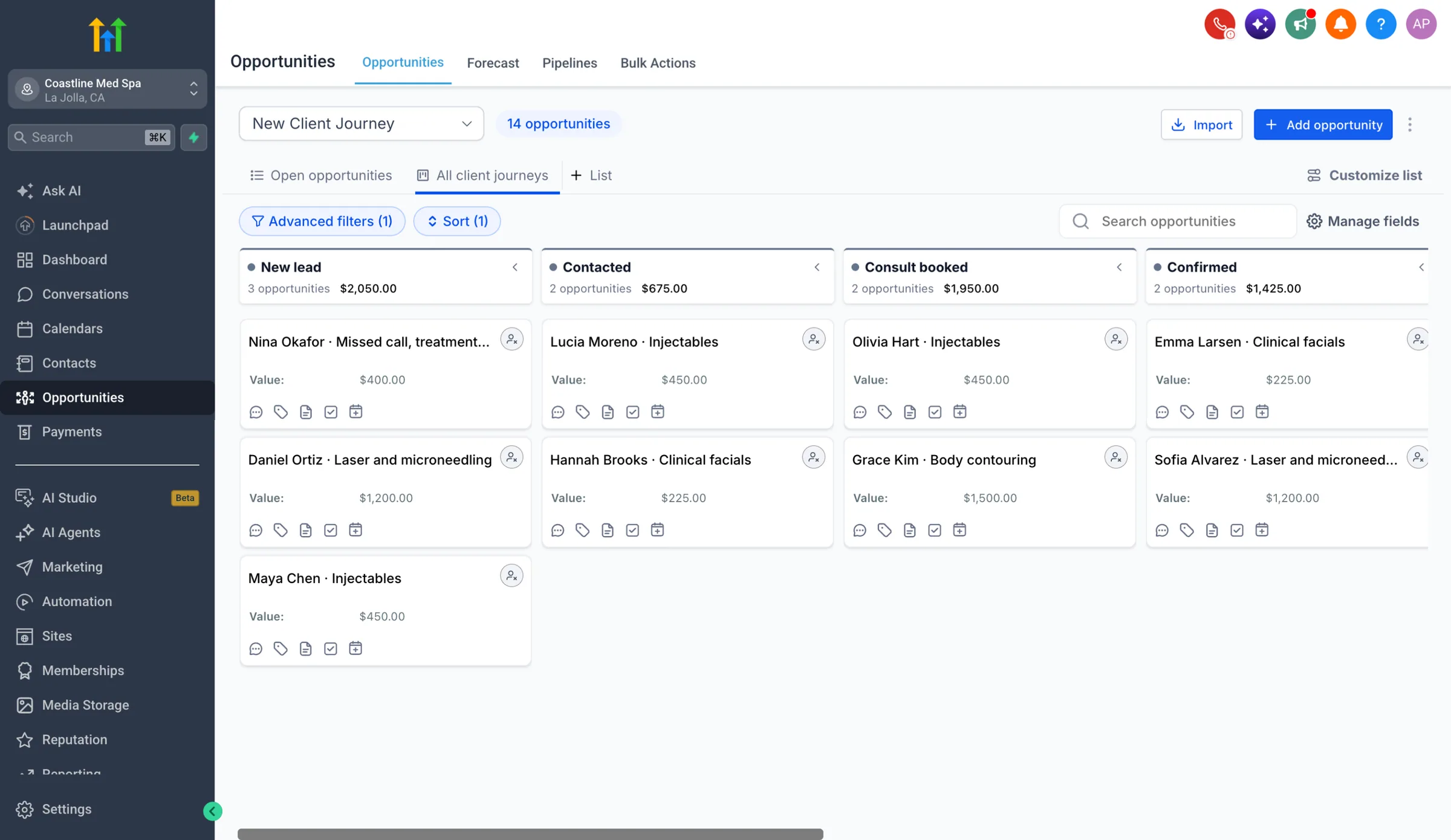
Coastline Med Spa's New Client Journey pipeline, from the first answer to the first treatment:
- New leadFinder, chat or missed-call lead
- ContactedFirst reply sent or received
- Consult bookedA time is on the calendar
- ConfirmedReplied C to the reminder
- ShowedCame in for the consult
- Treated (won)Paid for a first treatment
- No-showMissed it, gets a rebook text
- Not now (lost)Closed, with a lost reason
The board in HighLevel
14 opportunities, each with the treatment path and its value, so the board shows what the week is worth.
How to set it up in GoHighLevel
1Name the stages after what happened
In Opportunities → Pipelines, create the pipeline and add stages like New lead, Contacted, Consult booked, Confirmed, Showed and Treated, then No-show and Not now.
2Put a value on every opportunity
Use the typical first purchase for each path, so the pipeline totals mean something.
3Record lost reasons
When a lead is marked lost, pick a reason: price, timing, went elsewhere. Over a few months the reasons tell you what to change.
4Let workflows move the cards
Create the opportunity when a form or survey is submitted, move it when a consult is booked, confirmed or missed, so nobody has to drag cards by hand.
5Add a smart list for the whole picture
The board hides won and lost deals by default. A smart list with every status shows the full picture for reporting.
Common mistakes
- Stages named after people, not steps.
- No values, so the totals are empty.
- Lost leads deleted instead of marked lost.
- Cards moved by hand, so they're always out of date.
FAQ
How many stages should a pipeline have?
As many as real steps a lead takes, usually six to nine. Fewer stages hide where people drop off.
Can a workflow move an opportunity to another stage?
Yes. Use the Create/Update Opportunity action when an appointment is booked, confirmed or missed.
Should no-shows be a lost stage?
Keep No-show as its own stage with a rebook text. Many no-shows book again.

Conversion designer. I design and build whole websites, funnels and landing pages in GoHighLevel and other page builders, write the copy and set up the tracking and A/B tests. CXL certified.