- Home
- Page builders
- GoHighLevel
- Speed-to-lead workflow
GoHighLevel · Guide · 7 steps
How to build a speed-to-lead workflow in GoHighLevel
Text and email a new lead within seconds, then follow up only until they book. The workflow I built for a med spa's treatment finder, step by step.
In this guide · 7 steps
Short answer
What is a speed-to-lead workflow in GoHighLevel?
A workflow that starts the moment a lead submits a form or survey, sends a text and an email right away, creates an opportunity so the team can call, and then follows up on a schedule. Every later message sits behind one check, whether a consult is booked, so the follow-up stops once they book.
In short
- The first text and email go out in seconds.
- Tag the lead and create an opportunity.
- Wait, then check: booked yet?
- Booked ends the workflow.
- End with a softer list, not silence.
The first few minutes after a form are when a lead is most likely to answer. A speed-to-lead workflow uses them, and the check before every nudge keeps it from pestering people who already booked.
Why it's built this way
Speed first: the first text and email go out the moment the survey is submitted, while the lead still has the page open. Then the workflow waits, and every later message sits behind one check: is there a consult on the calendar yet? If yes, it ends. Nobody gets a “still thinking about it?” text after they've booked.
WF01 at a glance
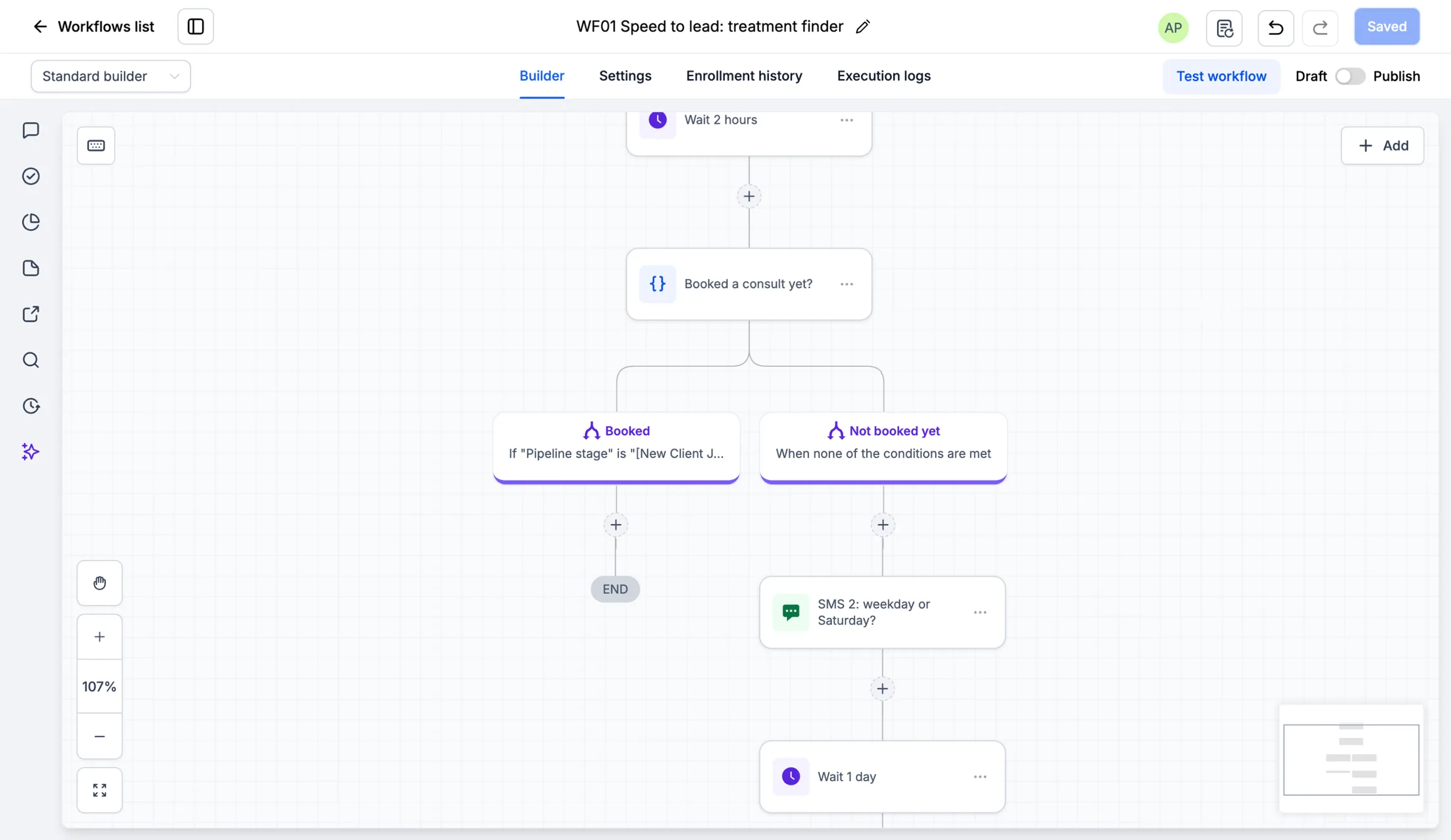
The workflow as built in the Coastline Med Spa account, from the trigger to END. It is saved as a draft in the account.
- TriggerSurvey submitted
- Add contact tagTag: finder lead + $100 offer
- Create opportunityPipeline: New lead
- Send SMS · InstantlySMS 1: your match + book link
- Send email · InstantlyEmail 1: your plan + $100 credit
- WaitWait 2 hours
- If/elseBooked a consult yet?
- BranchBooked: END
- BranchNot booked yet
- Send SMS · After 2 hours, not bookedSMS 2: weekday or Saturday?
- WaitWait 1 day
- Send email · Day 1Email 2: what happens at your consult
- WaitWait 2 days
- Send SMS · Day 3SMS 3: your $100 credit is saved
- WaitWait 4 days
- Send SMS · Day 7SMS 4: last note, plan stays open
- Add contact tagTag: newsletter (monthly)
- EndEND
How to build it in GoHighLevel
1Start from the survey or form
In Automation → Workflows, create a workflow from scratch and add the Survey Submitted trigger (or Form Submitted). Filter it to the one survey, so other forms don't start it.
2Tag the lead and create an opportunity
Add tags that say where the lead came from and which offer applies, then Create Opportunity in your pipeline at the first stage, so the team sees who to call.
3Text and email right away
Add Send SMS with the matched result and a booking link, then Send Email with the plan and the offer. Keep the first text under 160 characters, with the opt-out line.
4Wait, then check the pipeline
Add a Wait of about two hours, then an If/Else on the opportunity's stage: if it's Consult booked, end the workflow.
5Follow up on the Not booked branch
Space the nudges out: a question that's easy to answer, an email that answers the fear of the first visit, a reminder that the offer is saved, and a last friendly note a week later.
6End with a softer list
After the last note, add a tag that moves the contact to a monthly newsletter, so the conversation continues without daily messages.
7Test it before you publish
Submit the survey with a test contact, watch each action in the workflow's history, then book a consult and check that the follow-up stops.
Common mistakes
- Waiting hours before the first message.
- Follow-ups that keep going after a booking.
- No opportunity, so the team doesn't call.
- Texts without consent or an opt-out line.
- Publishing before the phone number is registered.
FAQ
How fast should the first text go out?
Within a minute. A workflow sends it the moment the form or survey is submitted.
How do I stop follow-ups once someone books?
Put an If/Else on the opportunity stage before every nudge, or add a goal event for the appointment, and end the workflow when it's met.
Do I need A2P registration to send texts?
In the US, yes: register the brand and campaign for your number before you publish a workflow that texts.
Should the workflow call the lead too?
A task or a call action for the team works well after the first text, especially for high-value offers.

Conversion designer. I design and build whole websites, funnels and landing pages in GoHighLevel and other page builders, write the copy and set up the tracking and A/B tests. CXL certified.