- Home
- Page builders
- Instapage
- Personalization guide
Instapage · Guide · 9 steps
How to personalize one Instapage page per ad group
Show each ad group its own headline, photo and proof, and change nothing else. The setup from a CRM demo page with a version for HVAC, plumbing and electrical.
In this guide · 9 steps
- Three trades, one page
- 1Build and publish the Default first
- 2Decide what changes, and nothing else
- 3Create an experience per ad group
- 4Edit only the listed elements
- 5Check the mobile view of each experience
- 6Add hidden fields
- 7Set the audience parameter
- 8Connect the ads in AdMap
- 9Test inside an experience, not across them
- FAQ
Short answer
How do you personalize an Instapage page per ad group?
Build and publish one Default page, then create an experience per ad group and change only the elements that name the audience: the eyebrow, H1, sub, photo, proof and testimonial. Connect each experience to its ad group, so a search for “hvac crm” opens the HVAC version of the same URL.
In short
- One page, one URL, one experience per ad group. Not one page per keyword.
- Change only what names the audience: eyebrow, H1, sub, hero photo, proof, logos, testimonial, first feature.
- Disconnect a Global Block before you change it in one experience.
- Re-check the mobile layout of each experience. Headlines differ in length.
- Connect ads to experiences in AdMap, and keep a hidden field with the experience name.
A plumber who searched “plumbing crm” and an HVAC owner who searched “hvac crm” want the same product for different jobs. Instapage experiences let one page speak to each of them, with its own headline, photo and proof, on the same URL, with one place to change everything else.
This is the plan I wrote for Pipewell CRM's demo page: a Default and three trade experiences, connected to three Google Ads ad groups.
What you need
- An Instapage plan with personalization and AdMap
- A finished, published Default page
- Your Google Ads campaign with one ad group per audience
Three trades, one page
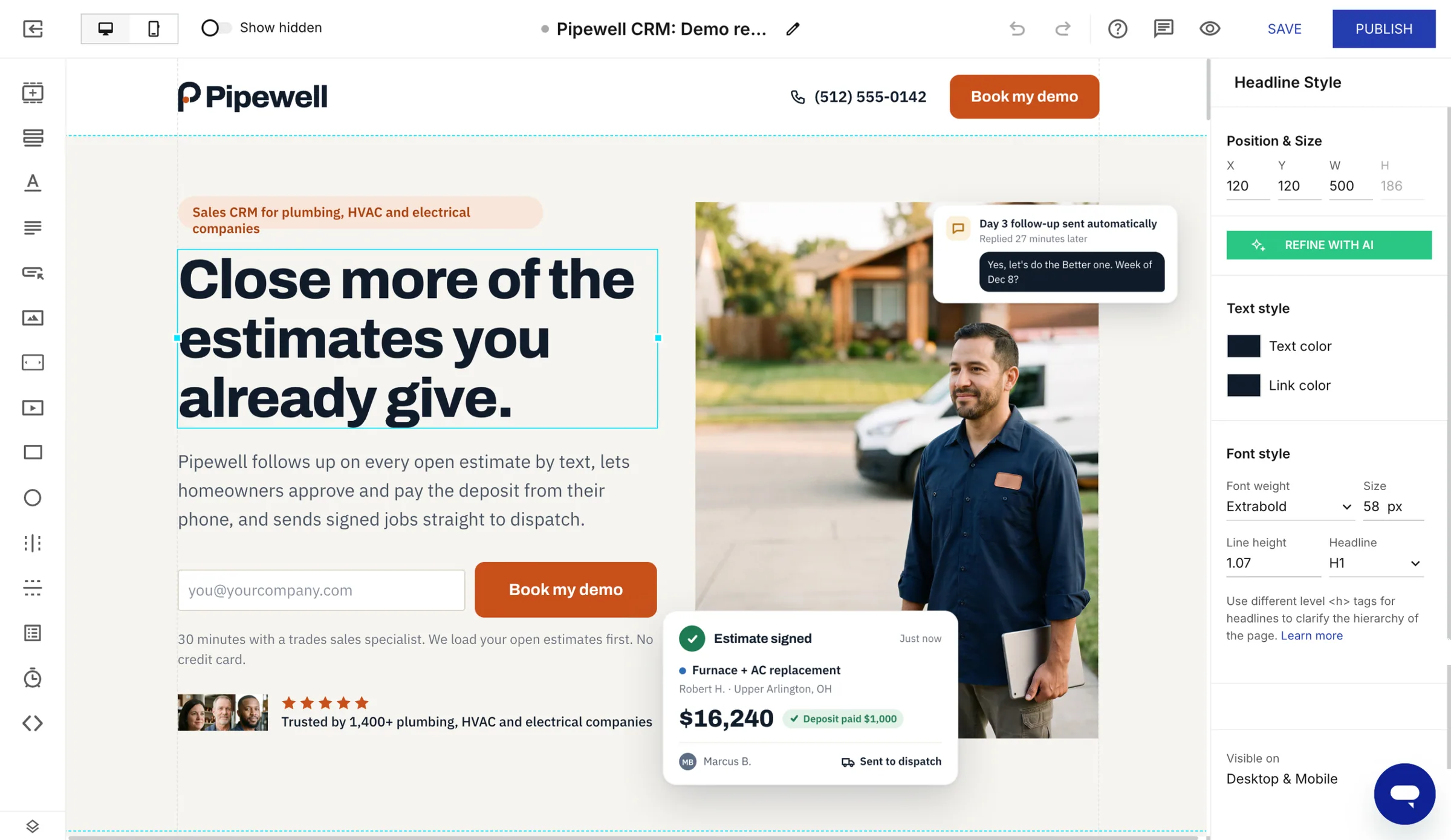
The demo page for plumbing, HVAC and electrical: only the parts that name the trade change.
1Build and publish the Default first
The Default is what everyone sees without a match: Meta, email, direct visits. Build it completely, desktop and mobile, publish it, and only then create experiences. Each experience starts as a copy of the Default, so every fix you make before this step is a fix you won't repeat three times.
2Decide what changes, and nothing else
List the elements that name the audience. For Pipewell it's eight:
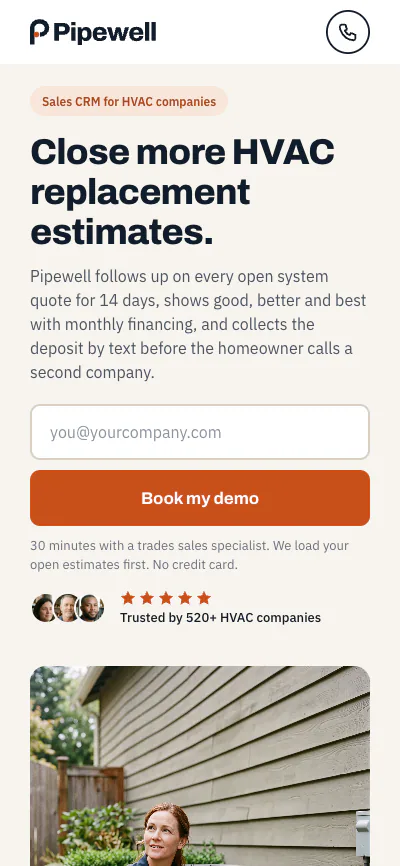
- Eyebrow pill: “Sales CRM for HVAC companies”
- H1: “Close more HVAC replacement estimates.”
- Sub-headline
- Hero photo and the signed-estimate card on it
- Proof line under the form
- Logo order (trade customers first)
- The big testimonial
- The first feature row
From my build: Keep the offer, the form, the price and the FAQ identical. When results differ between experiences, you'll know it was the message, not a different offer.
3Create an experience per ad group
Go to Optimize → Personalize → Create Experience, pick the page, name the experience after the ad group (HVAC) and create it. Repeat for Plumbing and Electrical.
From my build: Experiences need a published page. Until the Default is live, build each trade as its own page from the Default, with the same eight changes. That's how Pipewell's trade versions are built today, ready to become experiences.
4Edit only the listed elements
Click the experience name, then Edit Design. Change the eight elements and leave the rest alone. If an element sits in a Global Block (Pipewell's logo strip is “PW Logos”), disconnect it in this experience first. Otherwise reordering the logos for HVAC would reorder them on every page.
5Check the mobile view of each experience
Instapage keeps separate positions for mobile. A longer H1 pushes everything below it, so open the mobile view of each experience and nudge the sub-headline and the form so the work email field still sits in the first screen.
6Add hidden fields
In the form, set hidden fields with the experience name and a trade hint (experience = hvac, trade_hint = HVAC). Every lead then arrives with the version it saw, and sales can open the demo with the right examples.
7Set the audience parameter
In the experience's audience settings, use the Automatic parameter with a readable ID such as pipewell-demo-HVAC, then publish. The experience now has its own URL on the same page.
8Connect the ads in AdMap
AdMap works with search ads. Connect the ads of each ad group to their experience (Bulk Connect does a whole ad group), then Review & Push to write the experience URL into the ads' final URLs. Only published experiences can be pushed, so publish first.
From my build: Pin the ad's first headline to the same words as the experience's H1. The search, the ad and the page then say the same thing.
9Test inside an experience, not across them
An experiment runs on one experience URL, and the split can't change after it starts. Pipewell's first test (trade tiles first versus work email first) runs on the Default only, because the trade experiences already name the trade.
Personalization is message match at scale: one page to maintain, as many first impressions as you have ad groups.
FAQ
What is an experience in Instapage?
A version of a landing page for a specific audience. It starts as a copy of the Default and can change any element. Each experience is reached through its own URL parameter or UTM, on the same page.
How many experiences should one page have?
One per audience that needs a different message, usually one per ad group or trade. Keep the number small enough that each one gets enough traffic to learn from.
Does AdMap work with Meta ads?
No, AdMap connects search ads. For Meta, send traffic to the Default or to an experience URL directly in the ad.
Can I A/B test inside an experience?
Yes. Create an experiment on one experience URL. The split is set once and can't change after the experiment starts.
What happens to Global Blocks in experiences?
A Global Block is the same everywhere. To change it for one experience, disconnect it there first; the other pages keep the global version.

Conversion designer. I design and build whole websites, funnels and landing pages in Instapage and other page builders, write the copy and set up the tracking and A/B tests. CXL certified.