- Home
- Page builders
- Wix Studio
- CMS and dynamic pages
Wix Studio · Guide · 7 steps
How to use the Wix CMS and dynamic pages in Wix Studio
Put repeating content like your team or services in a CMS collection and design one dynamic page for it: every item gets its own page, and your team edits content, not layouts.
In this guide · 7 steps
Short answer
What are the Wix CMS and dynamic pages for?
They give every therapist, service or location its own page from one designed template. The team adds or edits an item in the collection and its page updates, so the site stays current without design work, and every page keeps the same layout and the same next step.
In short
- Collections for content that repeats: team, services, locations.
- One designed template, every element bound to a field.
- The same next step on every item page.
- SEO title and description per item.
- Check every item at every breakpoint.
People choose who treats them before they book. A profile page that answers “who is this, and are they right for me?” makes the booking feel safe.
When to use it
- Visitors choose a person or a service before they book.
- You have more than a handful of items that share one layout.
- Content changes often: new staff, new services, who's taking new patients.
- You want a page to rank for each item, like a therapist's name or a service in your area.
How to set it up in Wix Studio
1Plan the collection
List the fields the page needs before you build: photo and alt text, name, role, credentials, a short quote, bio, focus areas, certifications, education, languages, availability, clinic photos, SEO title and description.
2Import the items
Create the collection and import a CSV. Point image fields at files already in the Media Manager so the photos arrive with the items.
3Design the page as a normal page first
Get one complete profile right at desktop, tablet and mobile before you make it dynamic. It's faster to design with real content than with placeholders.
4Make it a dynamic item page
Add a dynamic item page for the collection with a readable URL pattern, such as /therapists/{name}. Move the designed layout onto it.
5Bind every element to a field
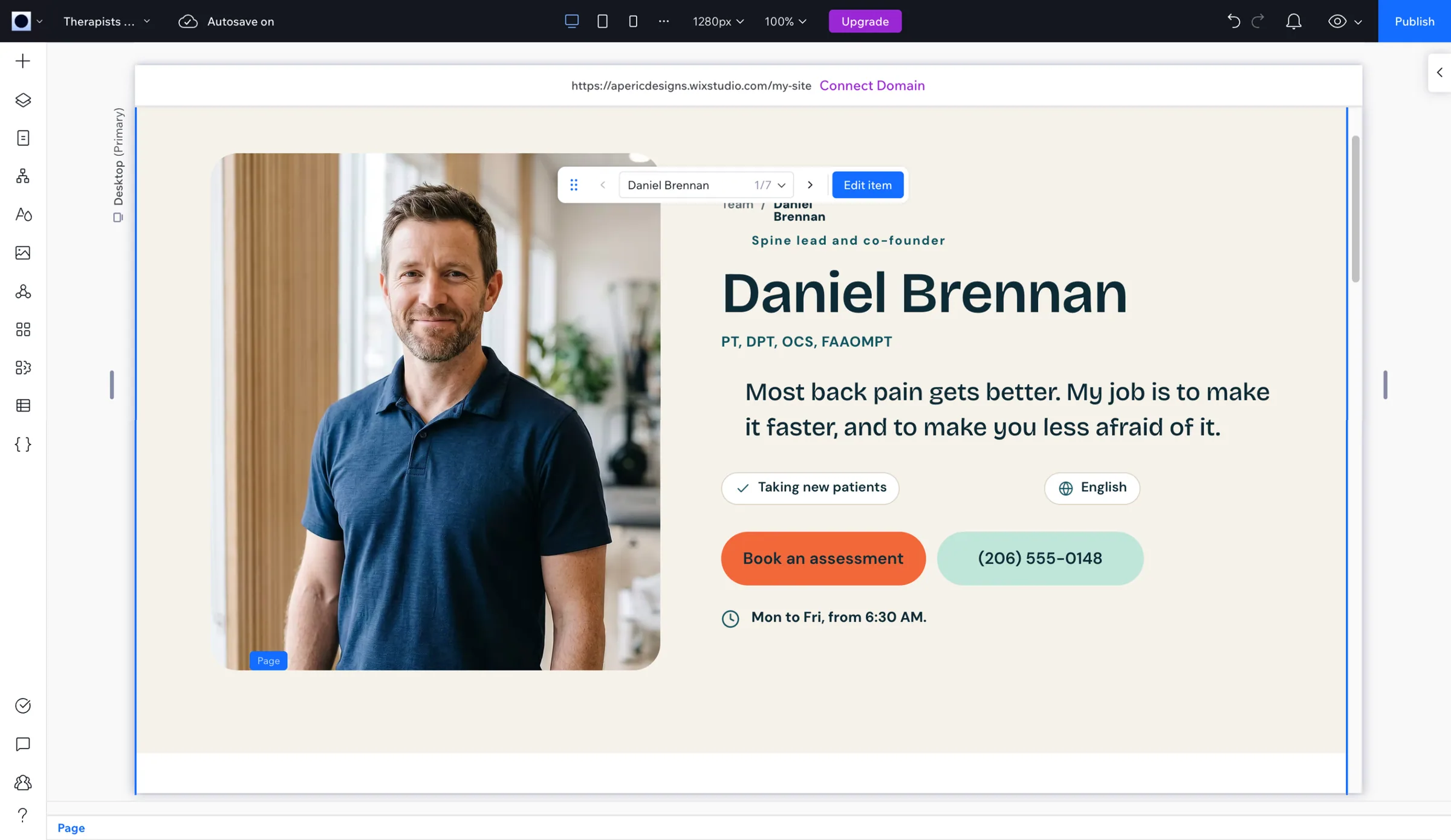
Connect each element: the photo and its alt text, the name in the breadcrumb and the H1, role, credentials, quote, languages, availability, bio, focus areas, certifications, education and the clinic photos. Copy that only fits one person becomes generic or a field of its own.
6Link to the item pages
Link each card on the team page to its item page, and keep the Book button in the same place on every profile.
7Check every item
Step through the items with the item switcher at each breakpoint. Long bios and long names are where layouts break.
The Harbor Physio example
Harbor's team runs from a Therapists collection: 7 therapists and 27 fields, imported from a CSV. One dynamic page, /therapists/{name}, shows each profile with every element bound to the collection, and the team page's cards link to it.
Common mistakes
- Binding only some elements, so old copy shows on every profile.
- No alt text field for the photos.
- Person-specific text left in the template.
- The same SEO title on every item page.
- Not checking long content on the mobile breakpoint.
FAQ
What's the difference between a CMS collection and a dynamic page in Wix?
The collection holds the content, one item per therapist or service. The dynamic page is the template that shows one item at its own URL.
Can my team add a new team member without a designer?
Yes. They add an item to the collection with its photo and text, and the page appears with the same design.
Are dynamic pages good for SEO?
Yes, if each item has its own SEO title and description fields bound to the page settings.
Can the team page filter by specialty?
Yes, with a repeater bound to the collection and a filter element, once the collection has a field for the area.

Conversion designer. I design and build whole websites, funnels and landing pages in Wix Studio and other page builders, write the copy and set up the tracking and A/B tests. CXL certified.