- Home
- Page builders
- Wix Studio
- Wix Forms
Wix Studio · Guide · 6 steps
How to use Wix Forms in Wix Studio to get more conversions
Short forms with clear labels, a topic dropdown that routes each question, and a send button that says what happens next.
In this guide · 6 steps
Short answer
How do you make a Wix Forms contact form convert?
Ask only what the first reply needs, put labels above the fields, add a topic dropdown so the right person answers, keep consent optional and unchecked, and lay the form out for each breakpoint so it's easy to finish on a phone.
In short
- Only the fields the first reply needs.
- Labels above fields, not placeholders.
- A topic dropdown routes the question.
- Optional, unchecked SMS consent.
- Its own layout at every breakpoint.
Some people won't call. A contact form is how they ask, and every unnecessary field is a reason to leave.
When it raises conversions
- Visitors want to ask before they book.
- People browse after hours, when no one answers the phone.
- Questions need to reach the right person.
- You want to reply by text, with permission.
How to set it up in Wix Studio
1Add a Wix Forms form
Add a contact form from the Add panel (Contact & Forms). Use a native form, not a picture of one, so submissions land in the inbox and contacts.
2Keep the fields to the first reply
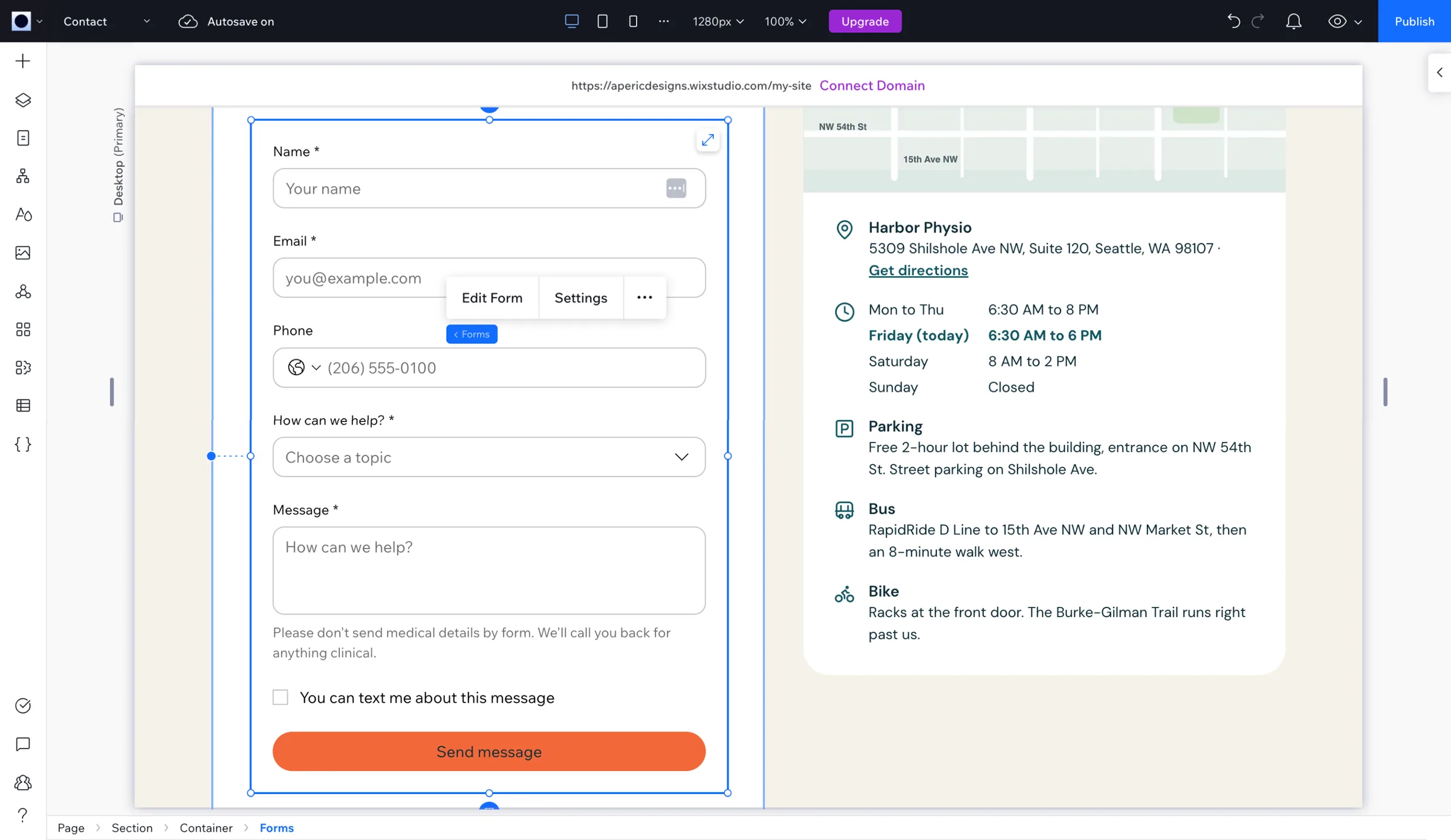
Name, email, phone with a country picker, a “How can we help?” dropdown and a message. Make required only what you need to answer.
3Label above, help text below
Labels above the fields stay visible while typing. Add one line of help text where it prevents a problem, like “Please don't send medical details by form.”
4Ask for consent the right way
If you'll reply by text, add an optional, unchecked checkbox: “You can text me about this message.”
5Style the button and the fields
In the form's Design panel: white fields with a light border, rounded corners, and a button in the brand's action color that says what happens: “Send message”.
6Lay it out per breakpoint
Set the form's position and size at desktop, tablet and mobile. On a phone it should be one column, with the button reachable by thumb.
The Harbor Physio example
Harbor's contact page uses a native Wix Forms form: name, email, phone with a country picker, a “How can we help?” dropdown, message, a note not to send medical details, an SMS consent box and a coral Send message button, laid out for desktop, tablet and mobile.
Common mistakes
- Required fields that the first reply doesn't need.
- Placeholders instead of labels.
- Consent boxes ticked by default.
- No word on when they'll hear back.
- A desktop layout squeezed onto a phone.
FAQ
How many fields should a contact form have?
As few as the first reply needs. Name, a way to reply and the question are usually enough.
Should the SMS consent box be required?
No. Keep it optional and unchecked, and say what you'll text about.
Can a Wix form route questions to different people?
Yes. A dropdown for the topic lets you filter or notify the right person.
Do Wix Forms work on every breakpoint?
Yes, but set the layout for each one in Wix Studio so the form fits the screen.

Conversion designer. I design and build whole websites, funnels and landing pages in Wix Studio and other page builders, write the copy and set up the tracking and A/B tests. CXL certified.