- Home
- Page builders
- Leadpages
- Instant estimate guide
Leadpages · Guide · 9 steps
How to build an instant-estimate landing page in Leadpages
Show a real price range in three taps, before you ask for anything. The estimate from a kitchen and bath remodeler's page, with the real ranges and steps.
In this guide · 9 steps
- The four steps
- The estimate in use
- 1Write the price table first
- 2Build the page in Manual Mode
- 3Make the first three steps taps, not fields
- 4Show the range, then ask
- 5Carry the answers in hidden fields
- 6Repeat the range on the thank-you page
- 7Deep-link the ads
- 8Add the second offer
- 9Test a price-first variant
- FAQ
Short answer
How do you build an instant-estimate landing page in Leadpages?
Write a price table first, by room, scope and finish. Build three tap steps on the page that show a real range before any form, then put the contact form after the range and carry the answers to the thank-you page. On phones, the first step sits right under the Call now button.
In short
- The range is the offer. Show it before you ask for an email.
- Three taps, one decision each: room, scope, finish.
- Build the price table before the page. Every range on the page, in the ads and in the emails comes from it.
- Carry the answers in hidden fields, never personal data in the URL.
- Test the price-first version against the consult-first one.
Homeowners don't want to book a sales visit to find out whether a remodel costs $40,000 or $140,000. An instant estimate answers that in three taps, and the people who still book the visit after seeing the range are the ones worth the drive.
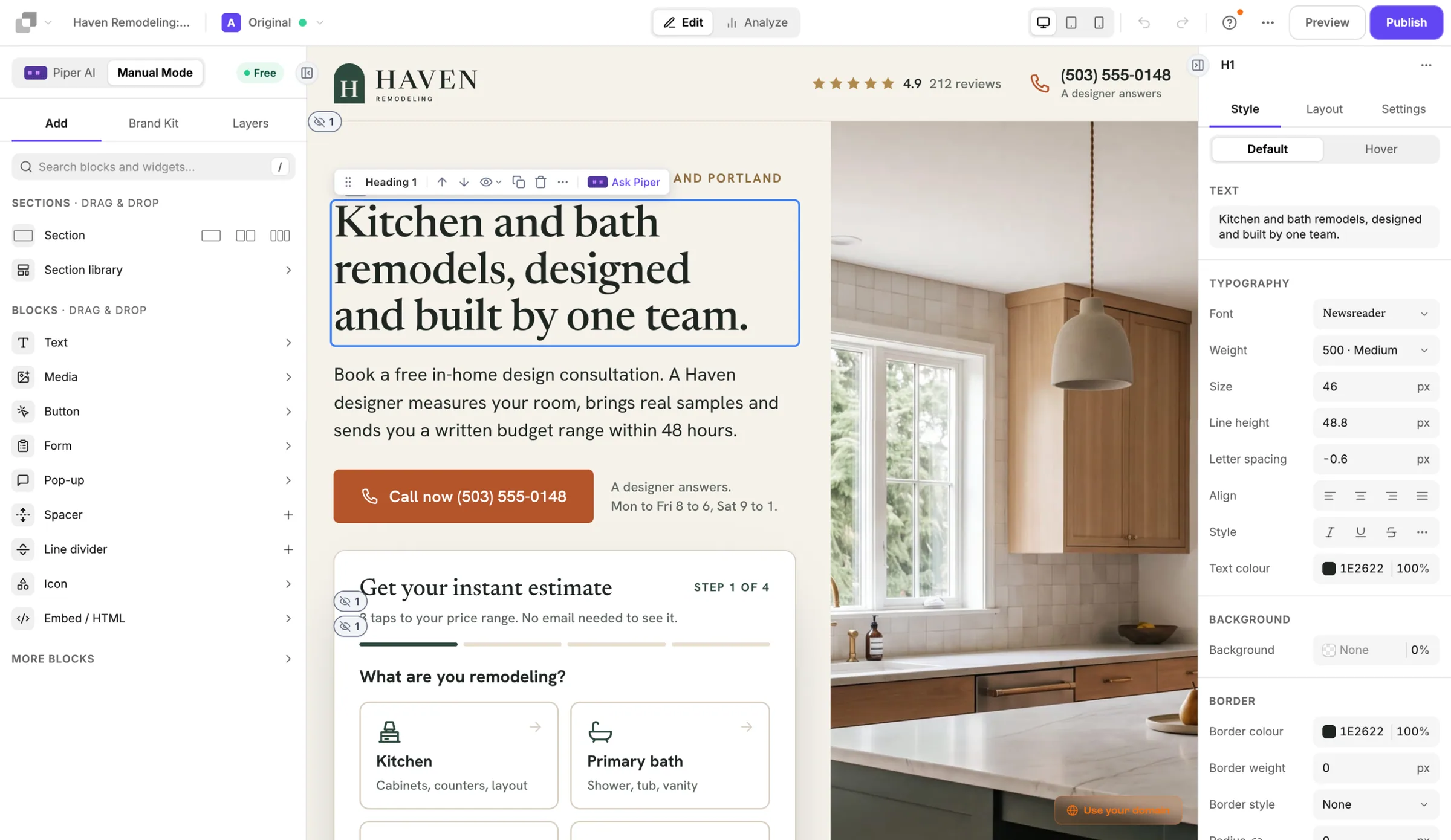
This is how I built it for Haven Remodeling's design consultation page in the new Leadpages builder.
What you need
- A Leadpages account (Manual Mode in the new builder)
- Your real price ranges by room, scope and finish
- A thank-you page and a form connected to your CRM or email tool
The four steps
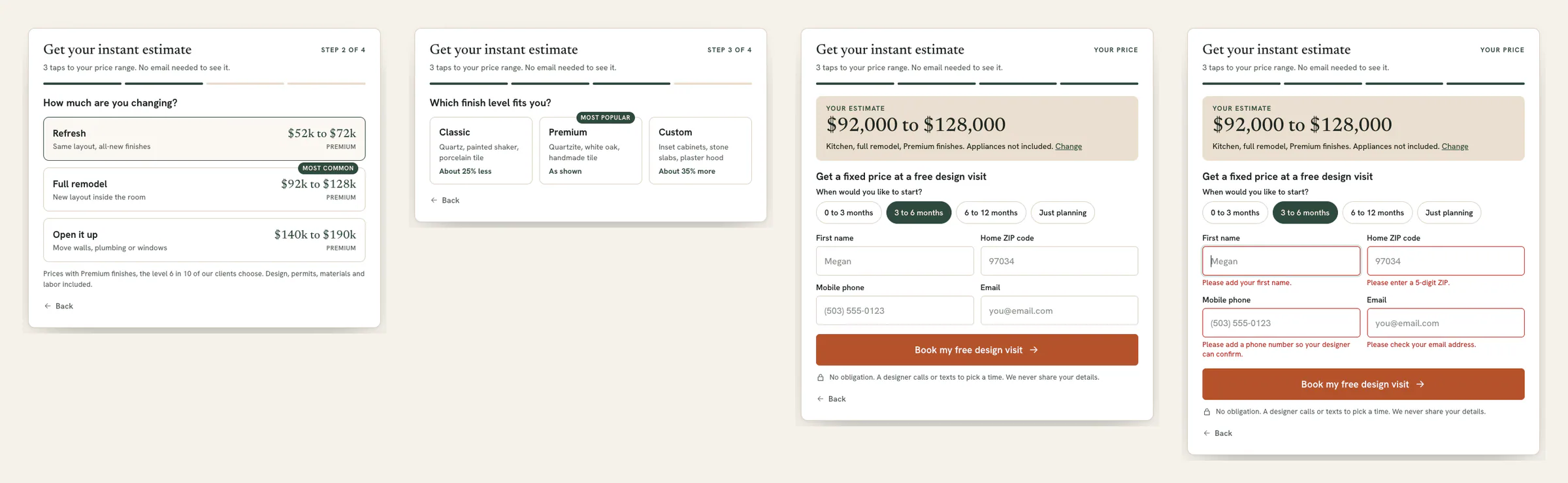
Scope with prices, finish level, then the range with the booking form.
The estimate in use
Three taps to a price range, then the booking form.
1Write the price table first
List each room and scope with a low and high price at your most common finish level, then a multiplier per finish. Haven's table, at Premium finishes:
- Kitchen: refresh $52k to $72k, full remodel $92k to $128k, open it up $140k to $190k
- Primary bath: $36k to $48k, $56k to $75k, $78k to $105k
- Guest bath: $24k to $32k, $40k to $52k, $55k to $70k
- Kitchen + bath: $82k to $112k, $140k to $190k, $205k to $275k
- Finish: Classic about 25% less, Premium as shown, Custom about 35% more
From my build: Say what's included right under the ranges: design, permits, materials and labor, appliances not. A range without its scope reads like a bait price.
2Build the page in Manual Mode
Set fonts and colors in the Brand Kit, then build the page from sections and blocks in Manual Mode. The hero holds the H1, a Call now button and the estimate card. On a phone, the estimate's first question has to be in the first screen, right under Call now.
3Make the first three steps taps, not fields
Step 1: what are you remodeling? Step 2: how much are you changing? Step 3: which finish level? Each is a set of large tiles. Nothing leaves the page until step 4, so the visitor is playing with prices, not filling in a form.
4Show the range, then ask
Step 4 opens with the visitor's range in large type and a one-line summary (“Kitchen, full remodel, Premium finishes. Appliances not included.”). Under it, the ask: a free design visit for a fixed price, with first name, ZIP, mobile and email, and a start-date question with a sensible default.
5Carry the answers in hidden fields
Add hidden fields for room, scope, finish and the range, so the lead arrives with everything the designer needs before the call. If the page's own script can't run on publish, rebuild the steps with the native Form block and its multi-step option: one radio question per step, contact details last.
6Repeat the range on the thank-you page
Redirect to the thank-you page with only the non-personal answers in the URL (?room=kitchen&scope=full&finish=premium) and show the same range there, with who will call and when. Never put a name, phone or email in a URL.
7Deep-link the ads
A kitchen ad can open the page with ?room=kitchen, so step 1 is already answered and the visitor lands on step 2. One less tap, and the page continues exactly where the ad left off.
8Add the second offer
Not everyone is ready to book. Add a pop-up with the cost guide for an email, opened from a guide button on the page, with its own thank-you page. It catches the people the estimate didn't.
9Test a price-first variant
In Optimize, create an A/B test with Variant B: the estimate tiles show the ranges before the first tap. Set the goal to the estimate form submission, split 50/50, and add the Call now buttons as element-click goals for reporting. Let it run at least 14 days and to a minimum number of conversions per variant before you promote a winner.
The estimate turns the page into something people use rather than read. And the ranges you show become the first line of every conversation with a homeowner.
FAQ
Can Leadpages run a price calculator or quiz?
Yes. Use the page's own HTML and script for the steps, or the native Form block with the multi-step option. Keep contact details on the last step and the answers in hidden fields.
Should I show prices before asking for an email?
For high-ticket services, yes. A real range answers the first question visitors have, and the people who book after seeing it are better prepared for the visit.
How do I pass the estimate to the thank-you page?
Redirect with only the non-personal answers in the URL, such as room, scope and finish, and compute the range again on the thank-you page. Keep personal data out of URLs.
How do I A/B test a Leadpages page?
Open the page's Optimize panel, create an A/B test and a variant, set the conversion goal and the traffic split, then start the experiment and promote the winner when it's clear.
Can I add a pop-up in Leadpages?
Yes. Pop-ups are their own assets in Leadpages, with their own form. Open one from a button or link on the page and send the form to a thank-you page.

Conversion designer. I design and build whole websites, funnels and landing pages in Leadpages and other page builders, write the copy and set up the tracking and A/B tests. CXL certified.