- Home
- Page builders
- Unbounce
- DTR guide
Unbounce · Guide · 8 steps
How to set up dynamic text replacement in Unbounce
Make the headline repeat what people searched, with a safe default and fixed values per ad group. The setup from a dental implant page, with the real dialog.
In this guide · 8 steps
Short answer
How does dynamic text replacement work in Unbounce?
Select the words in the headline, open Dynamic Text, name a URL parameter such as kw and set a default. Each ad group then sends a fixed value in its final URL, so the H1 says back the search in approved words, and the default shows when there is no parameter.
In short
- DTR swaps a few words on the page for the value of a URL parameter. Without the parameter, visitors see the default.
- Change the first words of the H1, not the whole sentence, and pick a default that reads well alone.
- Send fixed values per ad group with the Final URL suffix. Never print the raw search term.
- Save the value in a hidden field so every lead shows which headline it saw.
- Test on the published URL. The builder and Preview only show the default.
Message match is the cheapest conversion win in paid search: someone searches “all on 4 implants”, the ad says it, and the page says it back. Dynamic Text Replacement (DTR) does that on one Unbounce page for every ad group, so you don't need a page per keyword.
This is how it's set up on Brightline Dental's implant and Invisalign pages, built in Unbounce: one parameter, seven approved values, and a headline written to read well with all of them.
What you need
- An Unbounce landing page (classic or AI Hybrid Builder)
- Your Google Ads ad groups and their keyword themes
- A short, safe default for the headline
Try it: pick an ad group
The implants page H1 with each ad group's kw value. The default, Dental implants, shows when there is no parameter.
brightlinedental.example/dental-implants?kw=Dental%20implants
Implants and full-arch teeth · Austin, TX
Dental implants in Austin. One all-in price, teeth made in our own lab.
Free 3D CT scan ($395 value), a written all-in price, and plans from $84 a month.
Call now: (512) 555-01441Decide which words change
Pick the first words of the H1 and keep the rest of the sentence fixed. Brightline's implant headline is {Dental implants} in Austin. One all-in price, teeth made in our own lab. Only the part in braces changes, and the promise after it stays the same for everyone.
Choose a default that reads well on its own, because visitors from Meta, email or a direct visit see it: “Dental implants” on the implant page, “Invisalign” on the aligner page.
2Add the Dynamic text in the builder
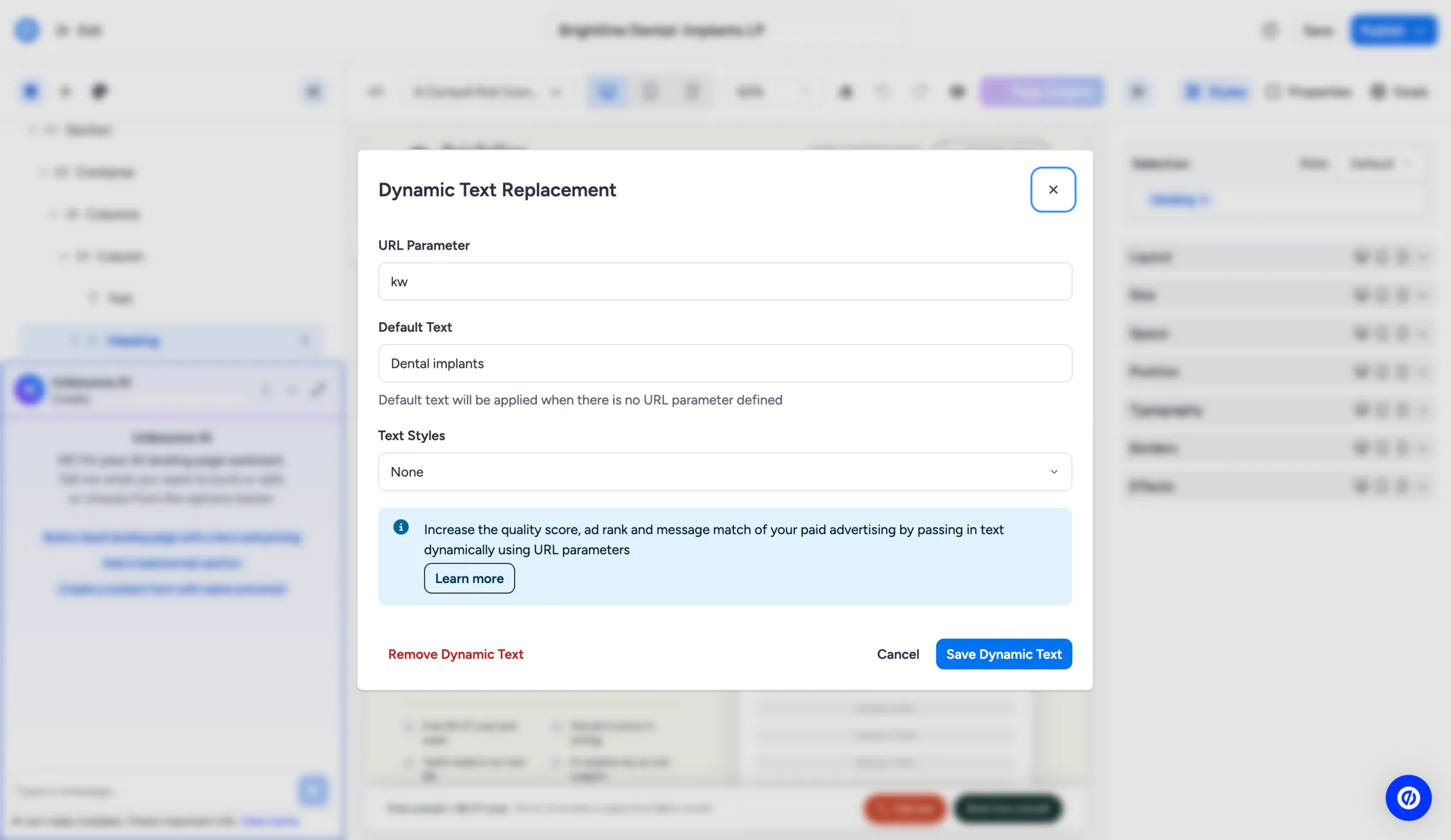
In the editor, select the heading and highlight the words that should change. Click Dynamic text, enter the URL Parameter (kw), keep the Default Text, and set Text Style to None, so values keep their own capitals (“All-on-4” stays “All-on-4”). Save the dynamic text.
From my build: Check the heading's text after you save. The rich-text editor can drop the spaces around the dynamic words when it rewrites the H1, and pasting new HTML in the code view replaces the DTR with plain text, so re-apply it after every paste.
3Use it in the page title too
In Page Settings, apply the same parameter to the first words of the page title: “Dental implants in Austin | Free 3D CT Scan | Brightline Dental”. The browser tab and any shared link then match the headline.
4Map every ad group to a fixed value
Write a table with one row per ad group: its keywords, the value it sends and the H1 that results. Brightline's implant page has seven:
- Core implants → Dental implants
- All-on-4 → All-on-4 implants
- Same-day teeth → Same-day teeth
- Cost and price → Dental implants from $3,950
- Full mouth → Full-mouth implants
- Implant dentures → Implant dentures
- Missing tooth → Tooth replacement
From my build: Don't pass the raw search term ({keyword}) into the headline. A search like “cheap dental implants near me free” would print on the page. Fixed values per ad group keep every headline approved.
5Send the value from Google Ads
At ad group level, set the Final URL suffix to the value, URL-encoded: kw=All-on-4%20implants. Spaces become %20, a dollar sign %24, a comma %2C. Keep your UTM parameters after it, and put the raw search term in utm_term={keyword} for reporting only.
kw=Dental%20implants%20from%20%243%2C950&utm_source=google&utm_medium=cpc&utm_campaign={campaignid}&utm_term={keyword}6Save the value in a hidden field
Add a hidden field named kw to the form so each lead records which headline it saw. When you compare ad groups later, you can see which promise brought the leads that booked, not only the clicks.
From my build: On Brightline's pages, kw sits next to the UTM fields, gclid and variant (A or B) as native hidden fields, so every lead carries its ad, its headline and its test variant.
7Check every variant and every length
If the page has an A/B variant, it reads the same parameter. Check that each value reads correctly in both headlines (“Dental implants from $3,950 in Austin. Know your price before you sit in the chair.” on Brightline's variant B).
Then check the longest value at 390 and 1440 wide. The headline should wrap cleanly, with nothing overlapping the form or the button.
8Test on the published page
The builder and the preview always show the default. Publish, then open the live URL with each value: ?kw=All-on-4%20implants, and once with no parameter. Submit a test lead and check the hidden field in the Leads tab.
Once DTR is in place, test the ad copy and the page together: an ad group's headline in the ad, the same words on the page, and one form that records it.
FAQ
What is Dynamic Text Replacement in Unbounce?
A feature that swaps highlighted words on the page for the value of a URL parameter. Visitors who arrive without the parameter see the default text you set.
Should I insert the search keyword directly into the headline?
No. Send a fixed, approved value per ad group through the Final URL suffix instead. The raw search term can be misspelled, odd or off-brand, and it would print on your page.
Why does my DTR not show in the Unbounce preview?
The builder and preview always show the default text. Test on the published URL with the parameter in the address.
Does DTR work with A/B tests and Smart Traffic?
Yes. Every variant reads the same URL parameter. Apply DTR in each variant and check that every value reads well in each headline.
How do I see which DTR headline brought a lead?
Add a hidden field with the same parameter name to the form. The value is saved with each lead.

Conversion designer. I design and build whole websites, funnels and landing pages in Unbounce and other page builders, write the copy and set up the tracking and A/B tests. CXL certified.