- Home
- Page builders
- Unbounce
- Multi-step form
Unbounce · Guide · 4 steps
How to build a multi-step form with hidden fields in Unbounce
Easy questions first, contact details last, and hidden fields that carry the source with every lead, all in one native Unbounce form.
In this guide · 4 steps
Short answer
How do you build a multi-step form in Unbounce?
Build one native form with every field, group the fields into steps with a little CSS and script in the page's Custom HTML, and show one step at a time. Put big answer tiles first and contact details last, and add hidden fields for UTM, gclid, the keyword and the variant so every lead keeps its source.
In short
- Easy questions first.
- Contact details last.
- One native form, split into steps.
- Hidden fields for the source.
- The first step in the first phone screen.
A long form scares people off. The same questions, one step at a time and the easy ones first, get finished.
The three steps
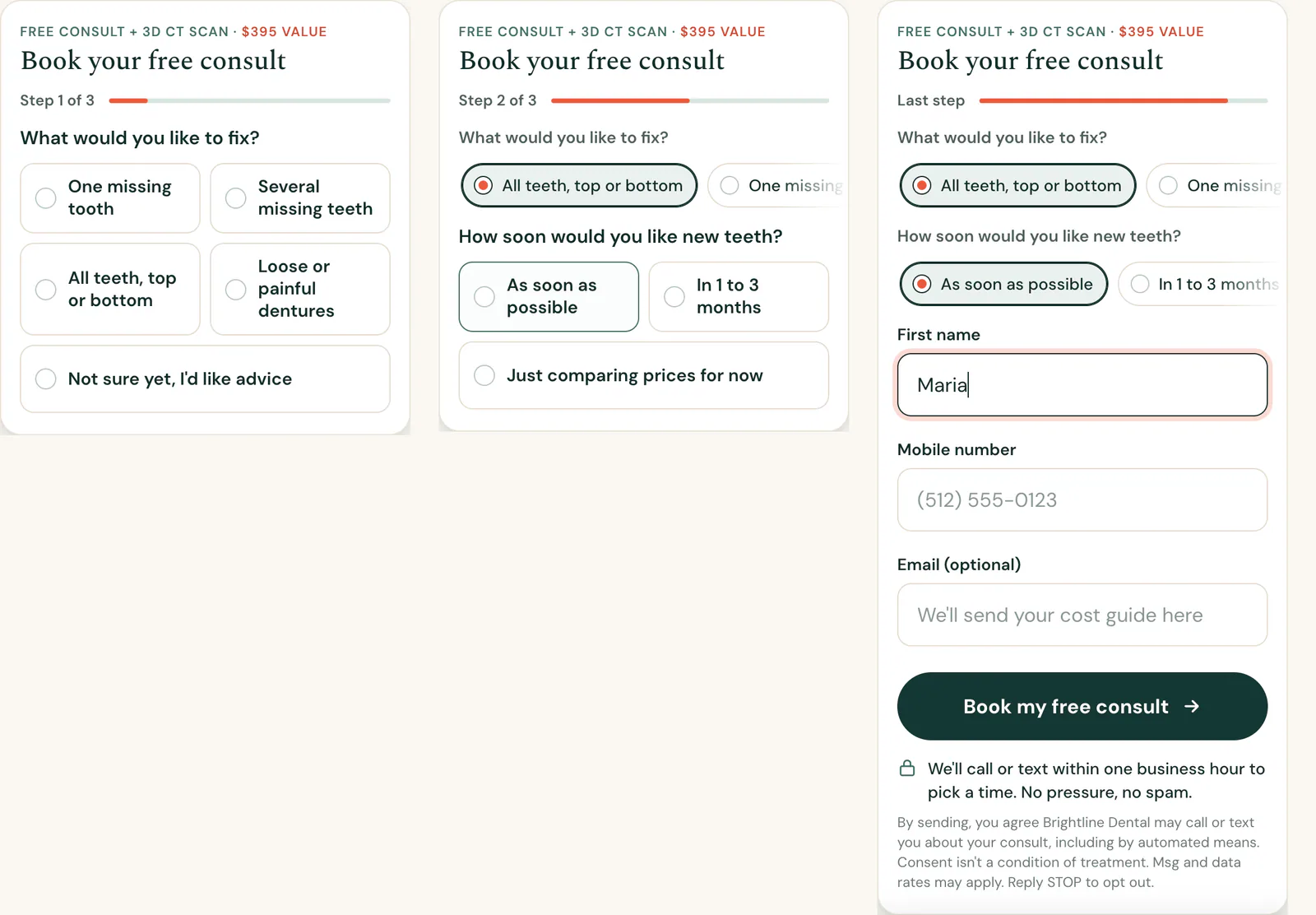
Five big answer tiles for the case, then timing, then contact. The steps are CSS inside one native Unbounce form, with a native submit button.
The form in use
A tap per question, contact details last.
How to build it in Unbounce
1Build one native form with every field
Add a Lead Capture form with all the questions, the contact fields and a submit button, so every answer lands in the same lead.
2Add hidden fields for the source
Add hidden fields named utm_source, utm_campaign, gclid, kw and variant. Unbounce fills hidden fields from URL parameters with the same name.
3Group the fields into steps
In the page's Custom HTML, wrap the fields into steps with a little CSS and script, and show one step at a time with Next and Back.
4Send it to a thank-you page
Set the form's confirmation to go to the project's Thanks page, where the conversion counts.
Common mistakes
- Contact details on step one.
- Ten steps for a simple request.
- No hidden fields, so leads lose their source.
- A step that needs scrolling on a phone.
FAQ
Does Unbounce have a native multi-step form?
Not in every builder. One native form split into steps with page CSS and script works everywhere and keeps one lead per submission.
How do hidden fields get their values?
From URL parameters with the same name as the field, such as ?kw= or ?gclid=.
How many steps should a form have?
As few as the questions need: two to four is common, with contact details last.

Conversion designer. I design and build whole websites, funnels and landing pages in Unbounce and other page builders, write the copy and set up the tracking and A/B tests. CXL certified.