Product page · Article 7 of 10
Product descriptions and specs: how to write and structure them
Write every description to the same level of detail. Put the key benefit in or right under the product name, show a short summary near the top, and use bullets for facts and short paragraphs for context. Use plain words, start the description close to the buy box on phones, and make specs consistent, explained and complete with units.
In this article · 10 tips
- What a product description has to do
- 1Write every description to the same level of detail
- 2Put the key benefit in the product name or right under it
- 3Show a short summary near the top of the page
- 4Use bullets for facts and short paragraphs for context
- 5Give long descriptions headings shoppers can scan
- 6Use plain words, not marketing language
- 7On phones, start the description close to the buy box
- 8Repeat the key facts in both the description and the specs
- 9Make specs scannable, consistent across products, and give every number a unit
- 10Explain spec labels shoppers might not know
- FAQ
In short
- Shoppers scan descriptions for the answer to one question. Headings and bullets let them find it.
- Marketing language makes products sound alike. Specific facts make them different.
- Specs only help if shoppers understand them and can compare them across products.
- One thin description among detailed ones makes that product look like the weak option.
What a product description has to do
The description is where shoppers go when the photos haven't answered their question. They arrive looking for something specific: the material, whether it's dishwasher safe, what it's for, how it compares to the other model. A description that's one block of brand language, or three vague lines, sends them away to search elsewhere.
Good descriptions do two jobs: explain why this product is worth buying, and answer the practical questions. The specs do a third: let shoppers compare.
1Write every description to the same level of detail
Every product of a type should get the same depth. One thin description makes that product look worse.
✕ Avoid
Stoneware mug
Glass mug
Great mug.
✓ Do this
Stoneware mug
Capacity · Material · Care
Glass mug
Capacity · Material · Care
Why it matters
When some products have rich descriptions and others have two lines, the thin ones look less trustworthy, and shoppers comparing products can't compare what isn't there. Inconsistency also hurts search: thin pages rank worse.
How to do it
- Make a description template per product type: what to cover (purpose, key features, materials, size, care, compatibility) and in what order.
- Fill every product to that template, starting with best sellers and products with high traffic and low conversion.
- Rewrite supplier descriptions in your own words; copied text helps no one and ranks poorly.
On ShopifyCode
Store template sections in metafields (materials, care, fit) so every product has the same structure and the theme shows them in the same place.
Quick test: Do all products of the same type have descriptions with the same level of detail?
2Put the key benefit in the product name or right under it
Put what the product is and what makes it different in the name or right under it.
✕ Avoid
The Ridge
$189
✓ Do this
Ridge waterproof hiking boot
Light enough for day hikes, warm to −20°C
$189
Why it matters
The product name is read by everyone; the description by far fewer. When the name is just a model code or a brand line ("The Classic"), shoppers learn nothing. A name or subtitle that says what makes it different does the first piece of selling.
How to do it
- Make the name descriptive: what it is plus the key differentiator ("Waterproof hiking boot", not just "Ridge").
- Add a one-line subtitle under the name with the main benefit or use ("Light enough for day hikes, warm to −20°C").
- Keep the brand's product name if it's known, but pair it with what it is.
On ShopifyTheme setting
Add a subtitle as a metafield shown under the title, or a text block that reads from a metafield.
Quick test: Does the product name or subtitle say what the product is and what makes it different?
3Show a short summary near the top of the page
Give the essentials near the buy box. Many shoppers decide from the first screen.
✕ Avoid
Spore probiotic
$49
Add to cart↓ Description is 6 scrolls down
✓ Do this
Spore probiotic
$49
✓Survives stomach acid
✓One capsule a day
✓Third-party tested
Why it matters
Many shoppers decide from the first screen. If the description starts far below the photos and options, they never see why the product is worth its price. A short summary near the buy box gives the essentials early.
How to do it
- Add two to four short bullet points or a couple of sentences near the buy box: what it is, who it's for, the key reasons to buy.
- Link to the full description for details ("Full details").
- Don't repeat the full description there; summarize it.
On ShopifyTheme setting
Add a text block or a "Highlights" metafield in the product information section, above or below the price.
Quick test: Is there a short summary of the product's key points near the buy box?
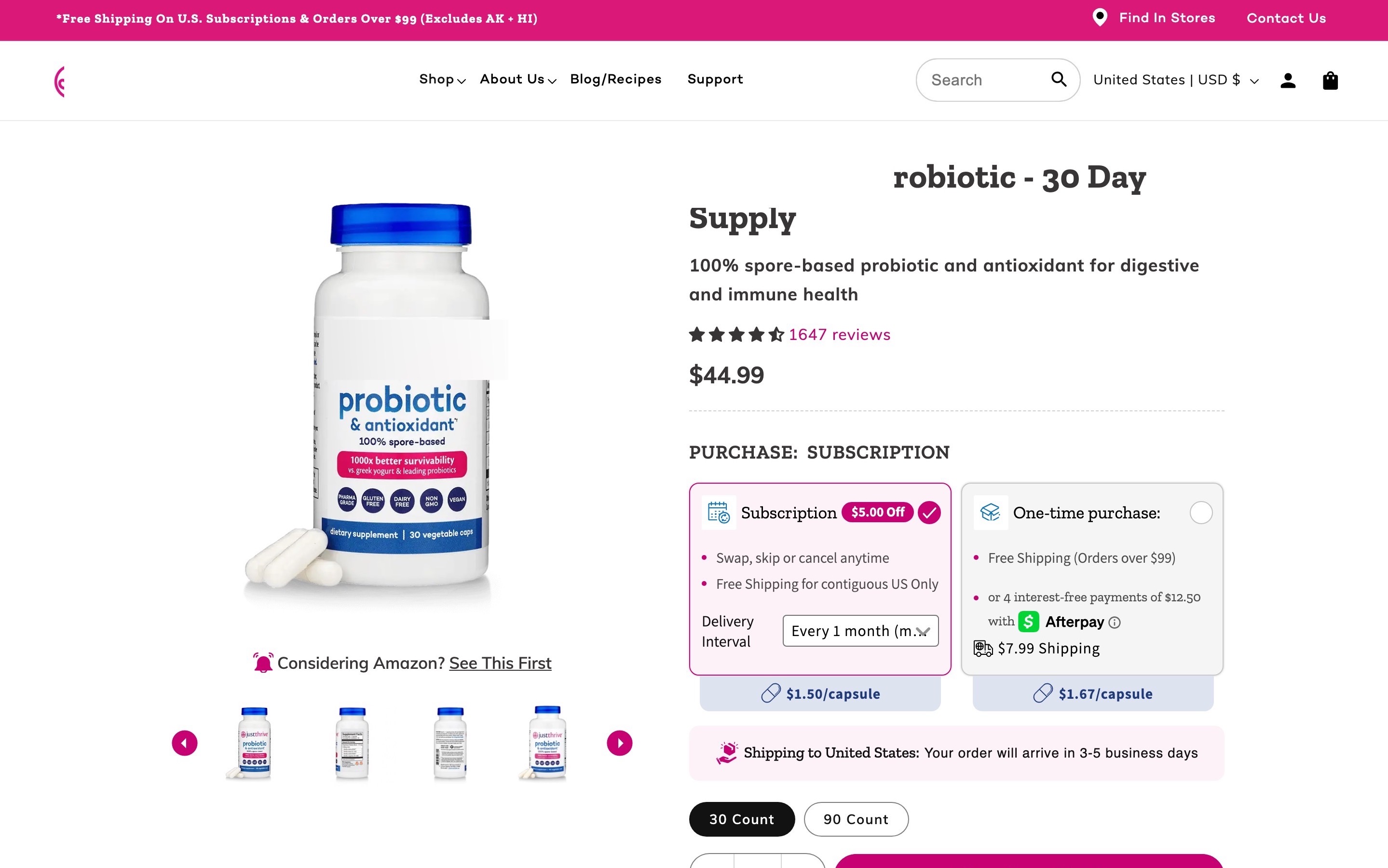
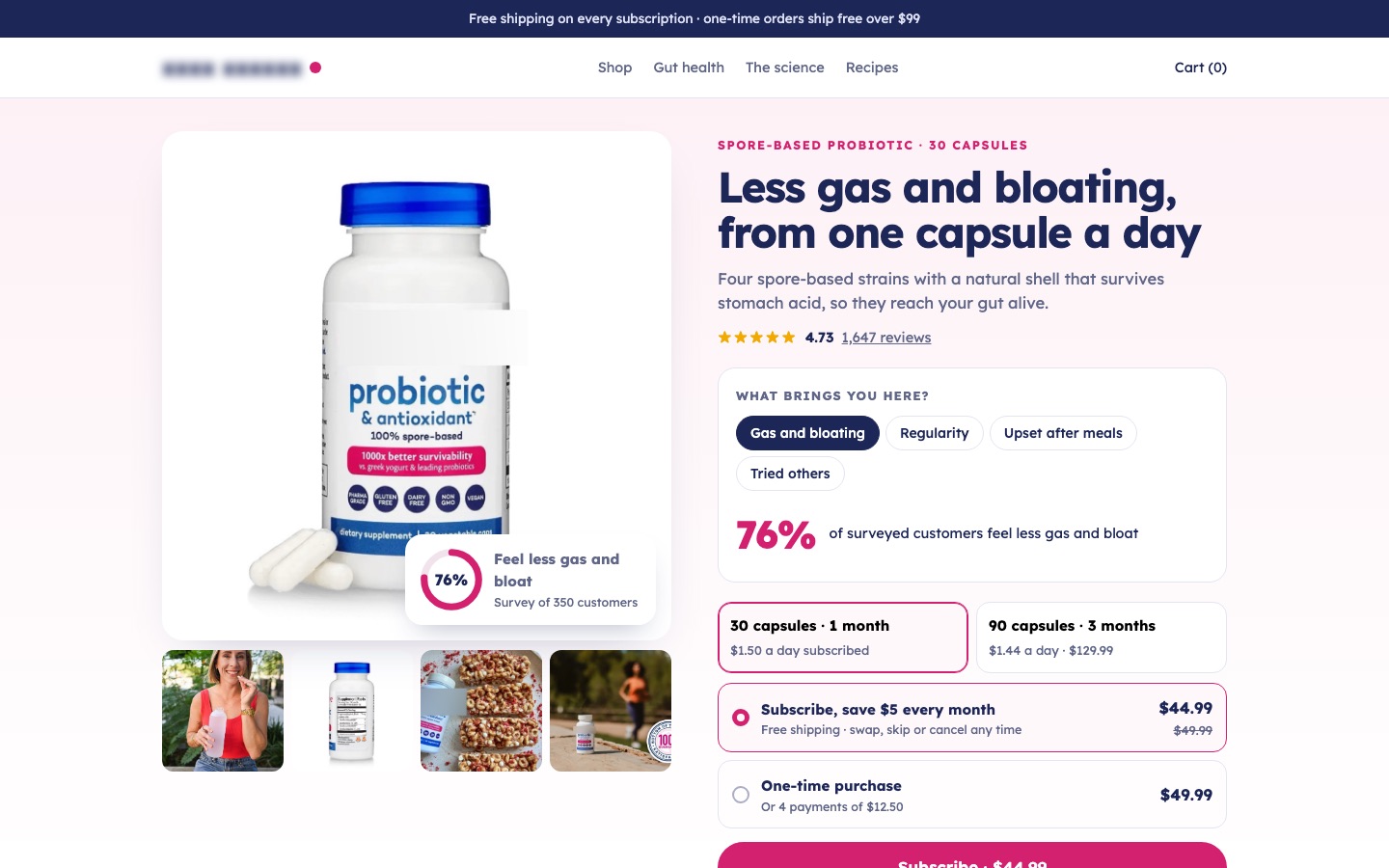
From my work · +8.6% subscription conversion rate
A spore probiotic had survey results most brands would lead with, buried far down the page. The redesign made them the headline near the top, added a picker that showed the result for each shopper's problem, and cleaned the buy box.
See the spore probiotic case study4Use bullets for facts and short paragraphs for context
Paragraphs for context, bullets for facts. A wall of either is hard to read.
✕ Avoid
About this blender
✓ Do this
About this blender
Smoothies, soups and nut butters in under a minute.
•1,400 W motor
•2 L jar, dishwasher safe
•7-year warranty
Why it matters
A wall of text is hard to scan; a list of 20 bullets loses the story. Bullets suit facts shoppers scan for (materials, dimensions, features). Short paragraphs suit what a list can't carry: how it feels to use, why it was made that way, who it's for.
How to do it
- Lead with one or two short paragraphs about what the product is and why it's good.
- Follow with bullets for features and facts, one idea per bullet, starting with the most important.
- Keep paragraphs to two or three sentences.
On ShopifyBuilt in
The Shopify product description editor supports paragraphs, bullets and headings.
Quick test: Does the description combine short paragraphs for context and bullets for facts?
5Give long descriptions headings shoppers can scan
Long descriptions are fine if headings let shoppers jump to what they care about.
✕ Avoid
Mattress
✓ Do this
Mattress
How it feels
What's inside
Care and trial
Why it matters
Long descriptions are fine, even useful, for complex or expensive products, but only if shoppers can jump to the part they care about. Headings turn a long text into a set of answers.
How to do it
- Split long descriptions into sections with clear headings: "How it works", "Materials", "Who it's for", "Care".
- Consider a "Highlights" structure: three to five key features, each with a short heading, a sentence and an image.
- Keep the most important section first.
On ShopifyTheme setting
Use headings inside the description, or split the content into collapsible rows and image-with-text sections fed by metafields.
Quick test: Are long descriptions split into sections with clear headings?
6Use plain words, not marketing language
Facts beat adjectives. "Premium" means nothing; "full-grain leather, 1.4 mm" does.
✕ Avoid
Leather laptop sleeve
Elevate your everyday with our premium, luxurious, timeless sleeve, crafted for the modern professional.
✓ Do this
Leather laptop sleeve
Full-grain leather, 1.4 mm thick. Fits 13" and 14" laptops. Wool felt lining. Darkens with use.
Why it matters
"Premium", "revolutionary", "elevate your everyday" appear on so many products that they mean nothing. Shoppers skip them looking for facts. Plain, specific language builds trust and helps people decide.
How to do it
- Replace adjectives with facts: not "premium leather" but "full-grain leather, 1.4 mm thick".
- Explain jargon the first time you use it, or avoid it.
- Write the way your customers talk about the product in reviews.
- Keep brand voice for the opening line, then get specific.
On ShopifyBuilt in
Nothing to set up. Check your descriptions against your reviews: if customers praise something you don't mention, add it.
Quick test: Is the description written in plain, specific words instead of marketing language?
7On phones, start the description close to the buy box
On phones, the description should start soon after the buy box, not below a pile of apps.
✕ Avoid
Trust badges
Reviews carousel
Instagram feed
Newsletter
Description ↓
✓ Do this
Free delivery by Thu · Free returns
Description−
Fit and sizing+
Why it matters
On a phone, everything below the buy box is a long scroll away. If apps, banners and recommendation rows sit between the buy box and the description, many shoppers never reach it.
How to do it
- Place the description (or its first section) directly after the buy box and delivery information on phones.
- Move badges, trust-icon rows and recommendation rows below it.
- Check on a small phone how far a shopper has to scroll to reach it.
On ShopifyTheme setting
Reorder blocks and sections in the theme editor's mobile preview, and remove app blocks that push content down.
Quick test: On a phone, does the description start soon after the buy box?
8Repeat the key facts in both the description and the specs
The facts that decide the purchase belong in both the description and the specs, with the same numbers.
✕ Avoid
Light at about 2.5 kg…
Weight2.1 kg
Capacity30 L
2.5 or 2.1 kg?
✓ Do this
At 2.1 kg, it's one of the lightest 30 L packs…
Weight2.1 kg
Capacity30 L
Why it matters
Some shoppers read the description, others go straight to the specs. If the battery life is only in the description or the material only in the specs, half your shoppers miss it.
How to do it
- Make sure the facts that decide the purchase (size, weight, material, capacity, compatibility) appear in both places.
- Keep the numbers identical in both. Mismatches destroy trust.
On ShopifyCode
Store key facts once in metafields and show them in both the description area and the specs table, so they can't drift apart.
Quick test: Do the deciding facts appear in both the description and the specs, with the same numbers?
9Make specs scannable, consistent across products, and give every number a unit
Specs are for comparing. That needs the same labels, order and units on every product.
✕ Avoid
Specifications
Weight2.1
SizeLarge
Battery5000
Wattage–
✓ Do this
Specifications
Weight2.1 kg
Dimensions52 × 30 × 20 cm
Battery5,000 mAh
Power65 W
Why it matters
Specs are how shoppers compare. If one product lists "Weight: 2.1" and another "Weighs approx. 2 kilos", and a third doesn't list weight at all, comparison is impossible. Supplier data is usually inconsistent, so it needs cleaning.
How to do it
- Show specs as a two-column table: label on the left, value on the right, with light row separators.
- Group long spec sheets (Dimensions, Power, Materials) and put the most important specs first.
- Use the same labels, order and units for every product of a type. Clean up supplier data before it goes live.
- Add the unit to every number (kg, cm, mAh, W), and show both metric and imperial if you sell internationally.
On ShopifyCode
Use metafields with definitions (dimension, weight, volume types carry their unit) and render them as a table in the theme, so every product follows the same structure.
Quick test: Are specs shown in a consistent table, with the same labels and a unit on every number?
10Explain spec labels shoppers might not know
Explain specs that only experts understand, in words shoppers use.
✕ Avoid
Specifications
RatingIP67
Fabric300 GSM
Denier600D
✓ Do this
Specifications
WaterproofingIP67
Dust-tight, survives 30 min under 1 m of water
Fabric weight300 GSM
Midweight: warm but breathable
Why it matters
Specs like "IP67", "thread count", "GSM" or "denier" mean a lot to experts and nothing to most shoppers. Unexplained, they either get ignored or make shoppers feel they're in the wrong shop.
How to do it
- Add a short explanation next to technical labels: "IP67 (dust-tight, waterproof to 1 m)".
- Use a small info icon or tooltip for longer explanations, and make it work on tap.
- Translate specs into what they mean in use: "5000 mAh (about two days of normal use)".
On ShopifyCode
Add explanations as metafield definitions' descriptions or as text in the spec template.
Quick test: Are technical spec labels explained in plain words?
FAQ
How long should a product description be?
Long enough to answer what shoppers ask before buying, and structured so they can find it. Simple products might need 100 words; complex ones several hundred, split into sections.
Should product descriptions use bullet points?
Yes, for facts and features. Pair them with a short paragraph about what the product is and who it's for.
Can I use the manufacturer's product description?
Use its facts, but write the description in your own words. Copied text is on every other store selling the product and does nothing for search.
Sources

Conversion designer. I design, redesign and build online stores, product pages and landing pages, A/B test them and show what each change earned. CXL certified in Conversion Optimization and Ecommerce Marketing, and a guest speaker on ecommerce UX at NYU School of Professional Studies.